Japanese road systems in Cities Skylines 2 differ from the default Western roads in two ways: there is no roadside parking, and everything is narrower. Japan has little flat land for a lot of people, so roads are built as small as possible, and to own a car you need a home with a parking space of a set size — so cars park on private or paid lots, not at the kerb. With the Road Builder mod you remove the parking lanes, narrow the sidewalks, keep car lanes at the 3 m minimum and, for one-way highways in left-hand traffic, keep a 2 m shoulder on the left and cut the right one to 1 m. Without cars stopping at the kerb, traffic flows much more cleanly.
準備 · What you need
- The full “Japan Realism” playset ↓ (14.6 MB) — every mod and asset from the video in one file — import it in Skyve
- Road Builder ↗ — by TDW — custom road cross-sections
- Japan Pack ↗ — the official free Region Pack; most of the buildings in the video
- Parking Lot Tool ↗ — by Torbi — off-street car parks that cars actually use
- JP Parking lot (日本の駐車場) ↗ — by Touyu5859 — small Japanese coin parking with wheel stops
Japanese road systems in Cities Skylines 2 look different from the default roads for two reasons. Japanese streets are narrower, and almost nobody parks on them. In this guide I walk through the changes I made to the vanilla roads to replicate the look and feel of Japanese streets, in dense neighbourhoods, in the suburbs and in the countryside. You get the exact Road Builder settings, a side-by-side comparison with the Western-style roads that ship with the game, and real examples on Google Maps that show why Japan builds its roads this way.
The problem with Western road layouts
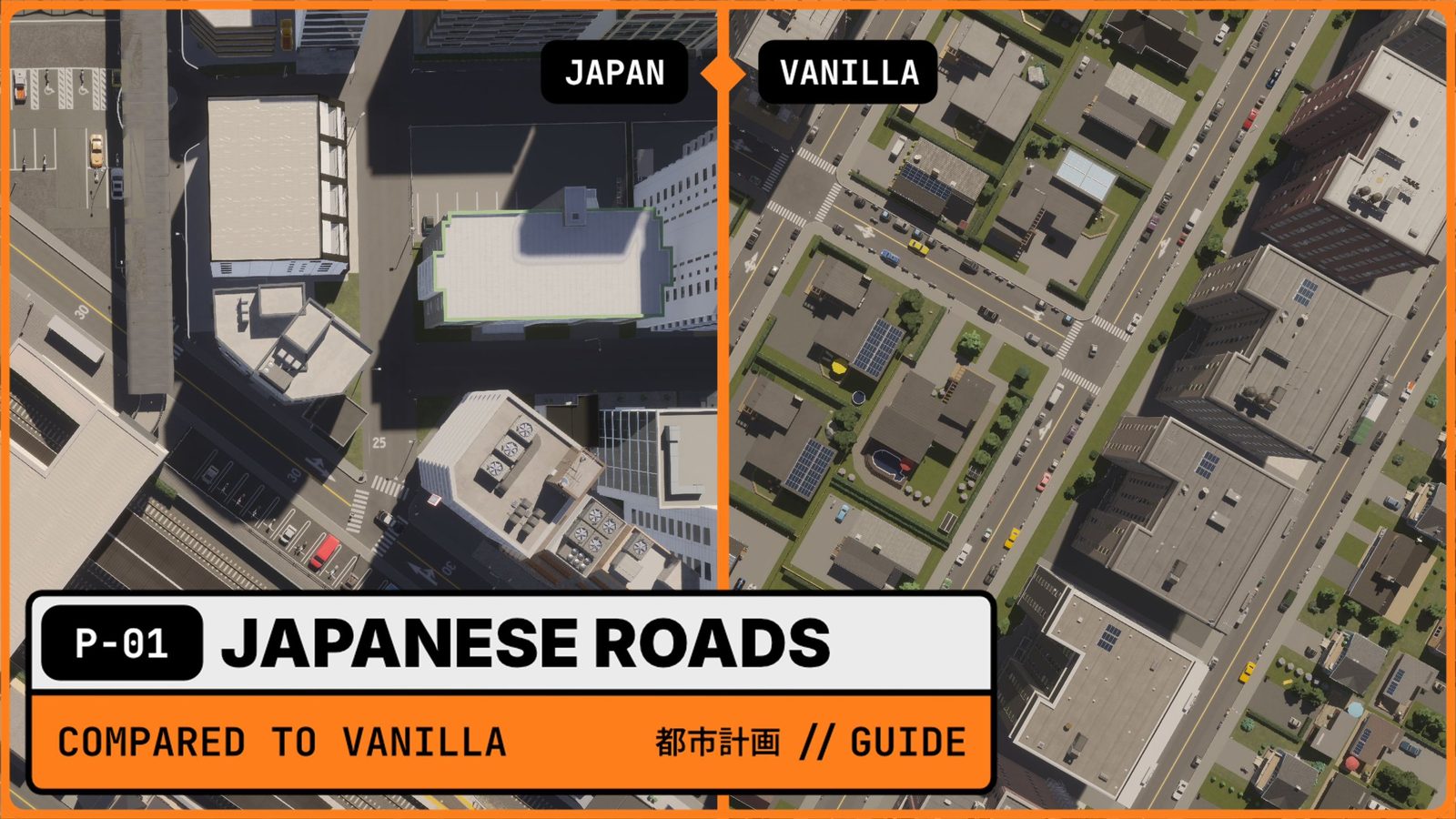
What you notice first when you put the two road systems side by side is the sidewalks. In Western cities, walkways are much wider than in Japan. In bigger Japanese cities like Tokyo and Kyoto you sometimes get wide walkways too, but not very often.
The most significant difference is less obvious: roadside parking. In most Western cities you can park at the kerb almost anywhere. I find that annoying in real life, and it’s just as annoying in the game. In one of my test cities I built a Western-style district, and as soon as the simulation runs you see cars parked along almost every road, wherever they can.
Look at the right half of the comparison above. The vanilla roads have parked cars along both kerbs for the whole length of the block, wide sidewalks with trees, and detached houses with gardens. That’s a perfectly good North American suburb. It’s just not Japan.
The vanilla North American two-lane road shows why it looks like that. It has a separate strip for parking and walking. The parking space gets roughly the width of a driving lane, and pedestrians get a huge space of around 5 m, depending on whether parking is allowed. Every car that pulls into or out of those spaces disturbs the traffic flowing past. On a quiet street you won’t notice. On a busy street next to shops, those small stops add up.
| Western road (CS2 default) | Japanese road (my version) | |
|---|---|---|
| Roadside parking | Allowed almost everywhere | Disabled |
| Sidewalks | Wide, around 5 m on the two-lane road | Narrowed |
| Car lanes | Standard width | 3 m (the Road Builder minimum) |
| Alleys and gravel roads | No parking | No parking (unchanged) |
| One-way highway shoulders | Standard | 2 m left, 1 m right |
| Driving side | Right | Left |
| Where cars park | At the kerb | Private, rented or paid lots |
| Typical street scene | Parked cars along both kerbs | Moving traffic, delivery trucks, taxis |
Configuring the Road Builder mod for Japanese road systems
Road Builder by TDW lets you create your own road cross-sections in Cities: Skylines 2. Once saved, a custom road appears in the road menu like any vanilla road. It’s part of the channel’s CS2 Mod Stack, together with the Japanese buildings and station assets you see in the screenshots.
Alleys and gravel roads: no changes needed
I didn’t change the gravel road or the alleyway. Neither the North American nor the Japanese version of them has parking. The alleyway deserves a special mention: it’s one of the most commonly used roads inside Japanese residential areas, so use it generously in your neighbourhoods. A grid of alleys between a few two-lane roads is much closer to a real Japanese suburb than a grid of full-size streets.
The two-lane road: where the difference is
On the regular two-lane road, three things change:
- Parking: disabled. This is the change that matters most.
- Sidewalks: narrower. Pedestrians still have space, just not the Western 5 m.
- Lanes: 3 m. Japanese roads are generally a little tighter than North American ones, so I wanted to go narrower, but Road Builder doesn’t let you go below 3 m per lane. That’s the closest you can get for now.
In the left half of the comparison image you can see the result: a two-lane street running past the station with no parked cars, painted speed limits on the asphalt, and the buildings close to the road.
Japanese road systems on the highway: shoulders for left-hand traffic
On highways, the four-lane highway with two lanes in each direction stays as it is, because it needs its shoulders. For the more important one-way highways I adjusted the shoulder widths, because Japan drives on the left:
- Left shoulder: 2 m. I left this one as it is.
- Right shoulder (the fast-lane side): 1 m. I cut it almost completely.
That matches what you see on bigger Japanese highways, both inside and outside cities. There’s usually only one usable shoulder, for cars that have crashed or broken down, and it’s on the left.
Step by step in Road Builder
- Start from the vanilla road you want to change, for example the two-lane road.
- Create a new road from it in Road Builder.
- Remove the parking lanes on both sides.
- Narrow the sidewalks.
- Set the car lanes to 3 m.
- For one-way highways, set the left shoulder to 2 m and the right one to 1 m.
- Save it with a clear name, for example “JP 2-lane”, so you can find it among the vanilla roads.
- Draw it over existing roads to replace them in place. Buildings along the road stay connected.
Once you know what to look for, you can spot right away which parts of a city use Western-style roads and which don’t.
Real-world geography and parking laws
Japanese road systems aren’t a style choice. They follow from geography and from the law. Both show up clearly on a map.
Why Japanese roads are so narrow
Available land for Japanese cities and communities is scarce, and a lot of people still need to live on it. Japan has far more inhabitants than Germany. Honshu, the main island, is smaller than Germany as a land mass, yet more people live on Honshu than in all of Germany.
On top of that, Japan has mountain ranges almost everywhere, a rough coastline in most places, volcanoes and very little flat land. Compared with Germany, where much of the land is flat, it’s a completely different starting point. That’s why Japan builds its roads just as small as possible: every metre of road is a metre less for homes, fields or railways.
Why nobody parks on the street
You might wonder where Japanese people put their cars, especially in Tokyo, Kyoto or Osaka. There are a couple of rules, and the most significant one is this: if you want to own a car, you need a residence with a parking space of a specific size. Before a car can be registered, the owner has to show proof of that space, the garage certificate (車庫証明, shako shōmei). On top of that, roadside parking isn’t officially allowed on most roads.
The consequence is a whole parking landscape that Western cities don’t have: spaces squeezed into the front of houses, monthly rented spaces, and small automated coin-parking lots on almost any vacant plot. You can see that landscape from above.
Reading the maps: where Japan parks its cars
I took a bird’s-eye look at three places on Google Maps, from the city centre to the countryside, and marked every parking space I could find in orange. Together they cover the three settings you’ll build in Cities: Skylines 2: a dense centre, a suburb around a station, and a town in the countryside.
Central Tokyo: no public car parks, almost no kerbside spaces
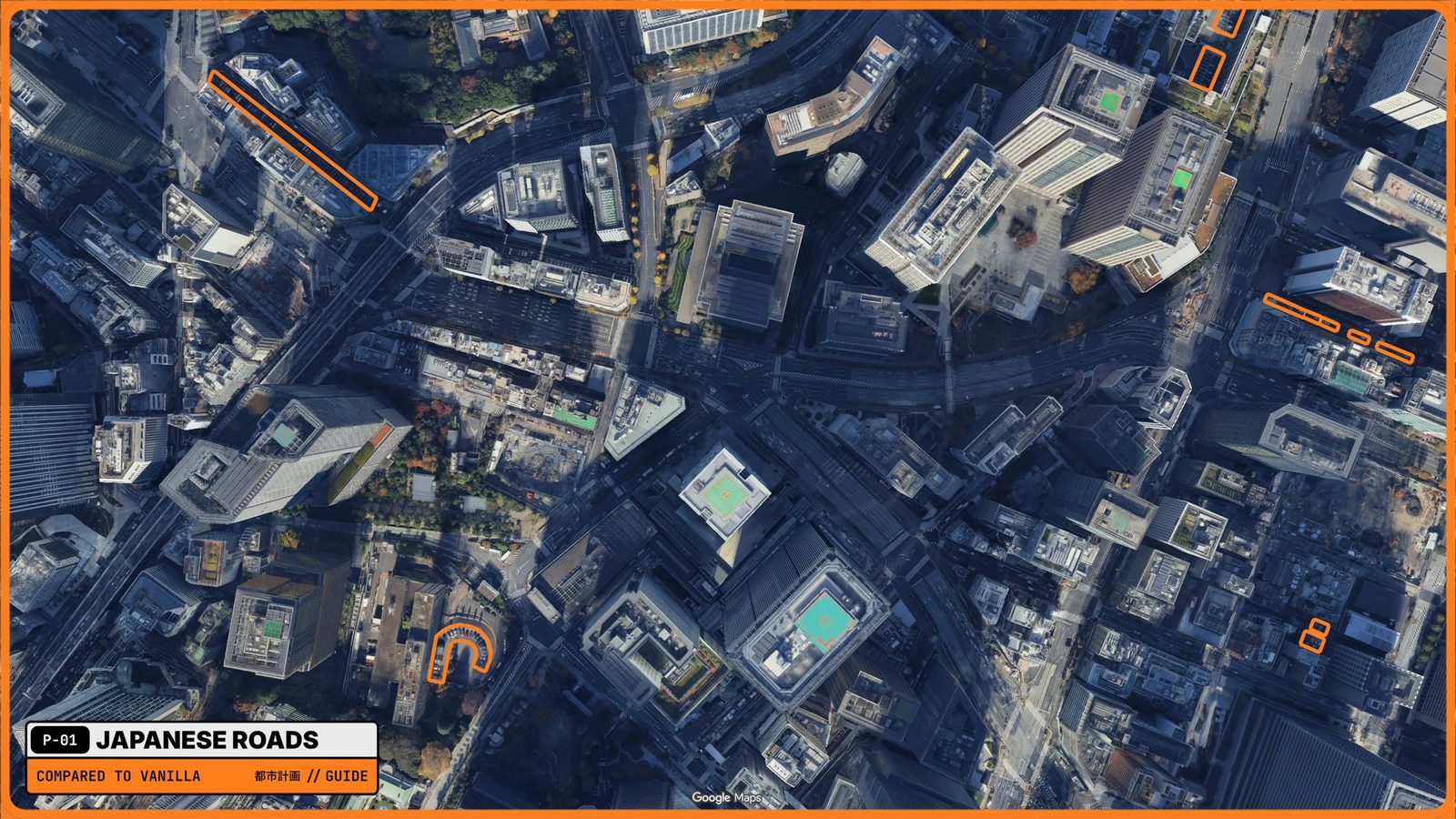
Between Akasaka and Kasumigaseki, Tokyo’s government and business district, there’s hardly any official public car park, and roadside parking isn’t allowed on most roads.
- The flat, tightly packed spaces on the right of the image are the one exception: actual street-side parking.
- Everything else, the larger rectangles and the U-shaped area in the lower left, is parking on private land: spaces that are rented out or paid as you go.
- The big roads stay clear. Look at the wide arterials and the large junction in the middle: lanes full of moving traffic, no cars at the kerb.
There’s literally no general roadside parking here. It keeps the traffic as smooth as possible and avoids the accidents and confusion that kerbside parking causes, especially in a large city.
For your build: in a dense CS2 downtown, don’t add public parking on every block. Give office towers and shops their own small car parks, use the Japanese road profile without parking lanes everywhere, and let the arterials carry moving traffic only.
Suburban Chiba: small pay lots around the station
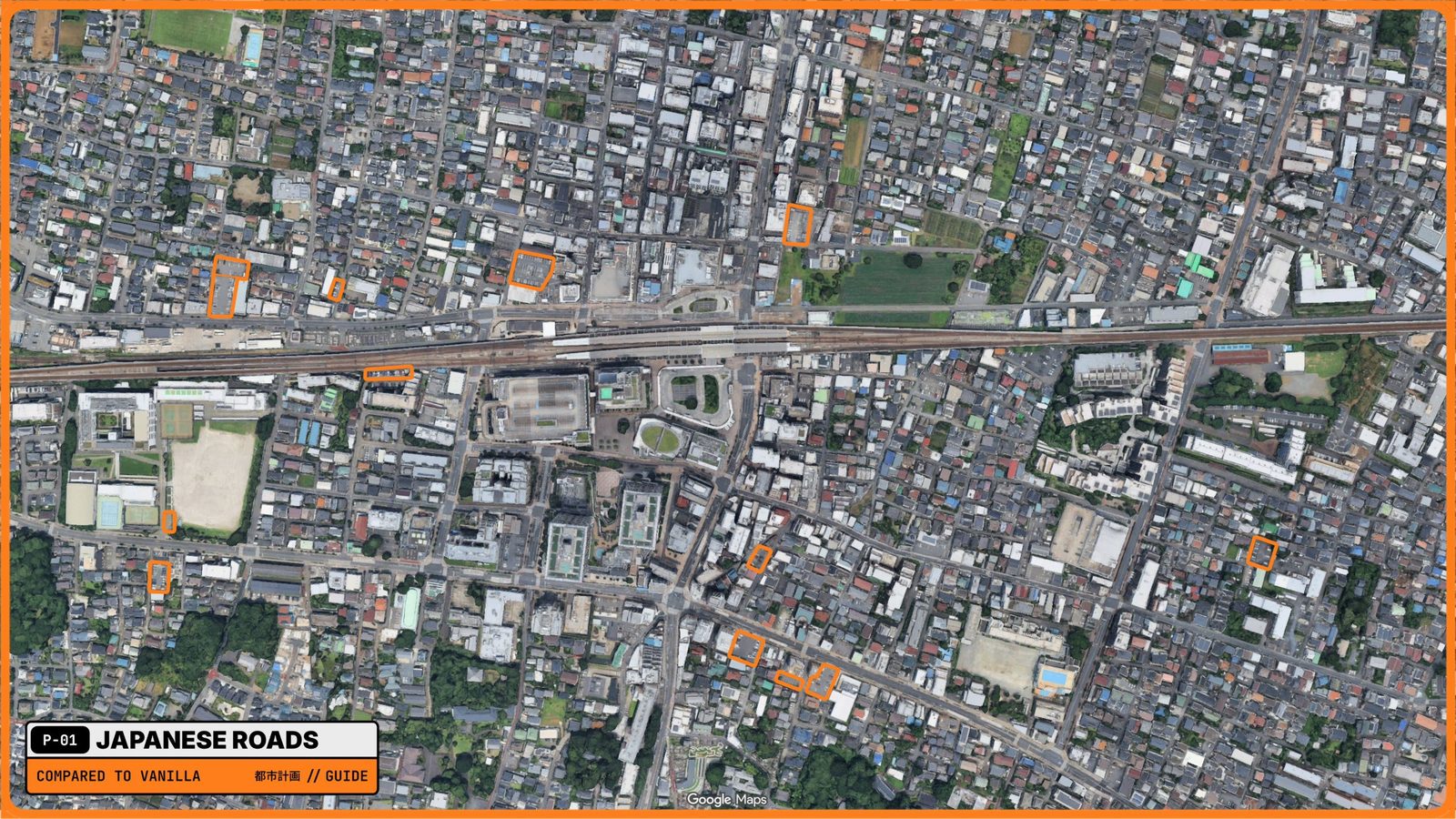
You might think the suburbs of Tokyo work differently. Around Higashi-Funabashi Station in Chiba Prefecture, part of Greater Tokyo, you wouldn’t spot any car parks at first glance. Once they’re marked, the pattern is obvious:
- Almost all of them are public pay lots. You put the car there, pay for a few minutes or hours, and pick it up again.
- They’re small and scattered, tucked into gaps between houses, on corners and along the railway, rather than one big car park.
- None of them is roadside parking. The residential streets themselves are narrow and clear.
Notice the rest of the picture too: a dense carpet of low-rise houses on a fine grid of narrow streets, mid-rise blocks clustered near the station, and a station square with a bus loop right at the exit. That’s the Japanese density gradient and the ekimae in one image.
For your build: this is where alleys and the Japanese two-lane road shine. Build the residential grid from alleys, keep a few two-lane roads as collectors, and drop small coin-parking lots into gaps instead of one large car park. The JP Parking lot asset with wheel stops, or the Parking Lot Tool, does this in the game.
Countryside: Shiobara Onsen
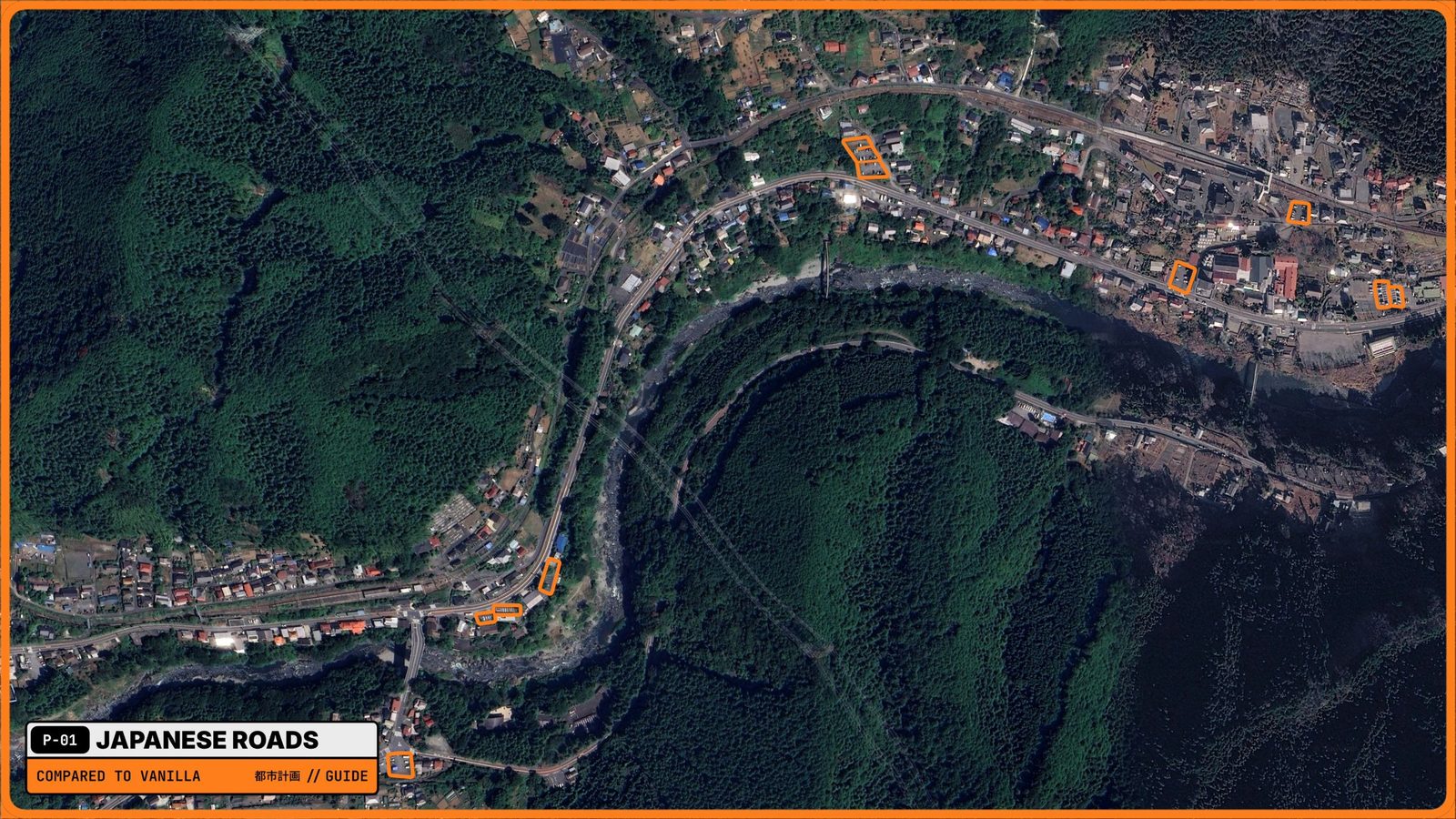
Further out, in the countryside, Shiobara Onsen is a hot-spring town and a popular getaway from Tokyo and the rest of Japan. You might expect roadside parking here, where space seems less of an issue. But look at the map: the town fills a narrow strip of flat land between a winding river and forested mountains, and one main road carries everything.
- Parking is either tied to a shop or inn, or it’s a public lot you pay for.
- There’s no roadside parking at all, even on the main road through town.
- The lots are small, a handful of spaces each, placed right next to what they serve.
So even here: no roadside parking, and no disturbance of traffic on the one road the whole valley depends on.
For your build: in a mountain valley in CS2, follow the river with one main road, keep the town in a long, thin strip, and place small lots next to inns and shops. Gravel roads and alleys branch off to houses on the slopes. It’s also the setting Project Shinano starts from: a mountain basin where every metre of flat land counts.
Designing a transit-oriented station plaza
The road settings pay off when you plan a whole district around them. For the comparison I built a Japanese-style, downtown-like area with a Shinkansen station on the right and a local commuter train station on the left.
What makes it work:
- Walkways and passenger paths connect everything, so citizens walk on their own paths instead of along the road.
- Distinct parking lots instead of street parking. There’s one car park along the road next to the train station and a tiny one between the two stations. That’s it for this build.
- Narrow Japanese roads everywhere else, with no parking lanes.
The result is easy to see when the simulation runs. There are delivery trucks on the roads, a police car heading to the commuter station, a few taxis, and hardly any private cars. The few cars that do come in park on the car park, which is exactly what it’s for. It keeps the city clean and removes a lot of the traffic problems you get with the vanilla standard roads.
For the bigger picture of stations, density and streets, see the guide to Japanese cities in Cities: Skylines II.
Japanese road systems by area: a quick reference
The maps translate into a simple rule of thumb for Cities: Skylines 2.
| Area | Real-world example | Roads to use | Where cars park |
|---|---|---|---|
| Dense centre | Akasaka / Kasumigaseki, Tokyo | Japanese two-lane roads, wide arterials without parking | Private car parks of shops and offices |
| Suburb around a station | Higashi-Funabashi, Chiba | Alleys for housing, a few two-lane collectors | Small coin-parking lots between houses |
| Countryside town | Shiobara Onsen, Tochigi | One main road along the valley, gravel roads and alleys | Small lots at shops, inns and attractions |
| Station plaza | Shinkansen + commuter station build | Narrow roads, bus loop, pedestrian paths | One car park beside the station |
| Highways | Japanese expressways | One-way highways with 2 m left / 1 m right shoulders | — |
Common mistakes
- Leaving vanilla roads in “just one” district. Parked cars at the kerb give a Western road away instantly, even among Japanese buildings.
- One huge car park instead of many small ones. Japanese parking is fine-grained. A suburb full of small lots looks right; a supermarket-style car park in the middle of a residential grid doesn’t.
- Full-size roads for every street. Residential areas need alleys. Save the two-lane road for collectors.
- Forgetting the driving side. Asymmetrical highway shoulders only make sense with left-hand traffic.
- Wide sidewalks everywhere. Wide walkways exist in the biggest cities, but they’re the exception. Use them around stations and in busy centres, not in every neighbourhood.
What Road Builder can’t do yet
The one thing I’m missing is the ability to recolour road markings. Japanese roads are marked differently: they use yellow in some places, though not everywhere, and highways have their own markings. Road Builder can’t change that yet. I’m planning a separate, quick episode purely about Road Builder, with some ideas on how to get closer.
What’s next
From here on the channel specialises in Japanese builds. They’re more of a challenge than a straightforward European or American-style city: there are more elements to bring in to make it as realistic as possible. I’m also working on custom assets, because Japanese cities need house types that don’t exist yet. For now most of the buildings come from the Japan Pack, plus Workshop assets that look even more like a real Japanese neighbourhood. They’re all listed on the Mod Stack page.
Summary
- Japanese road systems in Cities Skylines 2 come down to no roadside parking and narrower streets.
- In Road Builder: parking off, narrower sidewalks, 3 m lanes, and for one-way highways 2 m left / 1 m right shoulders for left-hand traffic.
- Alleys and gravel roads can stay as they are. Use alleys a lot in residential areas.
- The reasons are land scarcity and the rule that you need your own parking space to own a car.
- On the map, Japan parks on private land, small pay lots and shop car parks, from central Tokyo to a mountain onsen town.
- In your city, put parking in dedicated lots, ideally at the station.
Video chapters
- 0:00North American vs. Japanese road systems
- 1:06The problem with Western roadside parking
- 2:07Designing a Japanese station plaza (Shinkansen & commuter trains)
- 3:47Using the Road Builder mod for custom alleys & gravel roads
- 5:51Why are Japanese roads so narrow? (Geography & land scarcity)
- 7:29Highway design, shoulders & left-handed traffic rules
- 9:32Real-world Google Maps audit: Tokyo & suburban parking laws
- 13:33The final CS2 result: clean, flowing traffic
- 14:52Future custom Japanese assets & channel updates
Clicking a chapter starts the video above at that point.
FAQ
Why is there no roadside parking in Japan?
To own a car in Japan you need a home with a parking space of a specific size — the garage certificate (shako shōmei) proves it before the car can be registered — and roadside parking is not officially allowed on most roads. Cars park on private land, rented spaces or paid public lots instead.
How narrow can lanes be in the Road Builder mod?
3 metres is the minimum Road Builder allows for car lanes. Japanese roads are often a little tighter than that, but 3 m is the closest you can get in Cities: Skylines 2 today.
What shoulder widths fit a Japanese highway in Cities: Skylines 2?
For one-way highways in left-hand traffic, keep the left shoulder at 2 m and cut the right (fast-lane) shoulder to 1 m. Real Japanese highways usually have only one usable shoulder for breakdowns, on the left.
Do I need to change alleys and gravel roads?
No. The vanilla alleyway and gravel road already have no parking, in both the North American and the Japanese version. Alleys are among the most common roads in Japanese residential areas, so use them a lot.
Where do people park in Japanese cities?
On private land: a space at home, a rented monthly space, or a small paid coin-parking lot that's often squeezed between houses. In city centres, shops and offices have their own car parks; at suburban stations there are public pay lots.
Does removing roadside parking improve traffic in Cities: Skylines 2?
Yes. In the Japanese test district, the streets carry mostly delivery trucks, taxis and service vehicles, and the few private cars use a dedicated car park — compared with constant kerbside parking on the Western-style roads.
How many parking lots does a Japanese-style district need in CS2?
Fewer than you'd think. The station district in the video has one car park next to the train station and a tiny one between the two stations. Add small lots where the game shows demand, not on every block.
Can Road Builder change road markings to Japanese colours?
Not at the moment. Japanese roads use yellow markings in some places and different markings on highways, but Road Builder can't recolour road elements yet.